MAZ File Format
Hover! uses the Microsoft Foundation Classes (MFC) serialization framework to store texture data in TEX files. This documentation describes the binary file structure and explains how to read TEX files without relying on MFC.
All multi-byte integer values are stored in little-endian byte order, meaning the least significant byte comes first. For example, the 16-bit value 0x1234 is stored as 34 12.
General Structure
The structure shows the general layout using 4 entries for each collection to demonstrate counting of the MFC objects. The structure is split into 4 sections for better readability.
| CMerlinWorld |
|---|
| CMerlinWorld |
| CMerlinStatic Collection |
|---|
| CObArray (object_count) |
| NEW_CLASS_TAG |
| MFC Class Definition "CMerlinStatic" (MFC object 1) |
| CMerlinStatic (index 0, MFC object 2) |
| CLASS_TAG (reference to MFC object 1) |
| CMerlinStatic (index 1, MFC object 3) |
| CLASS_TAG (reference to MFC object 1) |
| CMerlinStatic (index 2, MFC object 4) |
| CLASS_TAG (reference to MFC object 1) |
| CMerlinStatic (index 3, MFC object 5) |
| CMerlinLocation Collection |
|---|
| CObArray (object_count) |
| NEW_CLASS_TAG |
| MFC Class Definition "CMerlinLocation" (MFC object 6) |
| CMerlinLocation (index 0, MFC object 7) |
| CLASS_TAG (reference to MFC object 6) |
| CMerlinLocation (index 1, MFC object 8) |
| CLASS_TAG (reference to MFC object 6) |
| CMerlinLocation (index 2, MFC object 9) |
| CLASS_TAG (reference to MFC object 6) |
| CMerlinLocation (index L, MFC object 10)) |
| CMerlinBSP Collection |
|---|
| CObArray (object_count) |
| NEW_CLASS_TAG |
| MFC Class Definition "CMerlinBSP" (MFC object 11) |
| CMerlinBSP (index 0, MFC object 12) |
| CLASS_TAG (reference to MFC object 11) |
| CMerlinBSP (index 1, MFC object 12) |
| CLASS_TAG (reference to MFC object 11) |
| CMerlinBSP (index 2, MFC object 13) |
| CLASS_TAG (reference to MFC object 11) |
| CMerlinBSP (index 3, MFC object 14) |
MFC Data Structure
MFC CObArray
| Name | Datatype | Description |
|---|---|---|
| object_count | uint16 | Number of elements in the serialized CObArray. |
MFC Tags
The CLASS_TAG is formed by performing a bitwise OR operation between 0x8000 and the reference ID of an existing class definition. For example, class ID 1 results in 0x8001.
| Name | Datatype | Description |
|---|---|---|
| NEW_CLASS_TAG | uint16 | 0xFFFF – Defines and registers a new class in the MFC reference table. |
| CLASS_TAG | uint16 | 0x8000 | class_id – References an existing class definition (e.g., 0x8001 for class definition at ID 1). |
MFC Class Definition
| Name | Datatype | Description |
|---|---|---|
| schema_version | uint16 | 0x0100 |
| name_length | uint16 | Length of the string in bytes. |
| name | unit8[name_length] | String data (ANSI). The class name of serialized object. |
MFC CString
This is a simplified representation of the MFC CString type. The length prefix uses a variable-size encoding depending on the string length. Since all texture names in Hover! are shorter than 255 characters, only the single-byte length prefix is required.
| string_length | uint8 | Length of the string in bytes (0–254). |
| string | uint8[string_length] | String data (ANSI, not null-terminated). |
CMerlin Data Structures
CMerlinWorld
CMerlinWorld is the main container that holds lists of CMerlinStatic, CMerlinLocation and CMerlinBSP. It might also serialize these classes to the CArchive.
These coordinates form a rectangle. The only use case known for now is collision detection. Outside of the boundary, no collision detection is performed.
| Name | Datatype | Description |
|---|---|---|
| x1 | uint16 | Minimum X coordinate of world boundaries. |
| y1 | uint16 | Minimum Y coordinate of world boundaries. |
| x2 | uint16 | Maximum X coordinate of world boundaries. |
| y2 | uint16 | Maximum Y coordinate of world boundaries. |
CMerlinStatic
| Name | Datatype | Description |
|---|---|---|
| object_name | CString | Name of the object/section, see Pad Types. |
| object_extension_data | Extension Data | Optional object data, normally empty. |
| x1 | uint16 | X coordinate of the first line endpoint. |
| y1 | uint16 | Y coordinate of the first line endpoint. |
| x2 | uint16 | X coordinate of the second line endpoint. |
| y2 | uint16 | Y coordinate of the second line endpoint. |
| line_extension_data | Extension Data | Optional line data, normally empty. |
| left_ceiling_texture | CString | Left ceiling texture. |
| right_ceiling_texture | CString | Right ceiling texture. |
| left_wall_texture | CString | Left wall texture. |
| right_wall_texture | CString | Right wall texture. |
| left_floor_texture | CString | Left floor texture. |
| right_floor_texture | CString | Right floor texture. |
| z1 | int16 | Z of lower sector. |
| z2 | int16 | Z of higher sector. |
| unknown_1 | uint16 | Unknown, initialized to 0. |
| unknown_2 | uint16 | Unknown, initialized to 0. |
| left_transparent | uint8 | Transparency flag for the left wall texture. |
| right_transparent | uint8 | Transparency flag for the right wall texture. |
| solid | uint8 | Solid/collision flag. |
| static_extension_data | CMerlinStaticExtension | Extended static data, normally 5 bytes. |
CMerlinStaticExtension
The CMerlinStaticExtension block contains five known bytes and supports optional additional data. Hover! reads the first five bytes when the block length is at least 5 and skips any remaining bytes. The original format uses a length of 5 bytes, but larger blocks are supported and have been successfully tested.
| Name | Datatype | Description |
|---|---|---|
| length | uint16 | Length of the extension data in bytes, normally 5. |
| unknown_3 | uint8 | Unknown, initialized to 0. |
| left_texture_offset | uint16 | Horizontal texture offset for the left wall. |
| right_texture_offset | uint16 | Horizontal texture offset for the right wall. |
| extra_data | uint8[length - 5] | Optional additional bytes, ignored by Hover!. |
CMerlinLocation
| Name | Datatype | Description |
|---|---|---|
| object_name | CString | Name of the object, see Location Types. |
| object_extension_data | Extension Data | Optional object data, normally empty. |
| x | uint16 | X position of the object. |
| y | uint16 | Y position of the object. |
| angle | uint16 | Orientation of the location in a 512-unit angular system (512 units = 360°). |
| z | uint16 | Z position of the object (height). |
| location_extension_data | Extension Data | Optional object data, normally empty. |
CMerlinBSP
| Name | Datatype | Description |
|---|---|---|
| object_name | CString | Name of the object, normally empty (0x00). |
| object_extension_data | Extension Data | Optional object data, normally empty. |
| x1 | uint16 | X coordinate of the first line endpoint. |
| y1 | uint16 | Y coordinate of the first line endpoint. |
| x2 | uint16 | X coordinate of the second line endpoint. |
| y2 | uint16 | Y coordinate of the second line endpoint. |
| line_extension_data | Extension Data | Optional line data, normally empty. |
| static_id | uint16 | Index of the associated CMerlinStatic object. |
| unknown_id | uint16 | A BSP node reference. Not clear yet how it is used by Hover! |
| left_id | uint16 | Index of the left child BSP node. |
| right_id | uint16 | Index of the right child BSP node. |
| unknown_1 | uint16 | Unknown BSP property. |
| unknown_2 | float64 | Unknown floating-point value. |
| unknown_3 | float64 | Unknown floating-point value. |
| bsp_extension_data | Extension Data | Optional BSP-specific extension data. |
Extension Data
A length-prefixed data block containing additional object-specific information. Its exact purpose is currently unknown. It is read by Hover! but the bytes are discarded. The only class that is using some kind of extension or meta-data is CMerlinStatic.
| Name | Datatype | Description |
|---|---|---|
| length | uint16 | Number of additional bytes to read. |
| data | uint8[length] | Optional data, ignored by Hover! |
Additional Notes
Angle Representation of Locations
Hover! uses a 512-unit angular system, where 512 units represent a full rotation of 360 degrees.
The angle can be converted to degrees using:degrees = angle * 360.0 / 512.0 and angle = degrees * 512.0 / 360.0
| Angle value | Degrees |
|---|---|
| 0 | 0 |
| 128 | 90 |
| 256 | 180 |
| 384 | 270 |
| 512 | 360, equivalent to 0 |
Location Types
Each location has a unique name that follows the pattern <TYPE>_<INDEX>, where TYPE identifies the location type and INDEX is a zero-based, two-digit number. For example, three locations of type HUMAN are named HUMAN_00, HUMAN_01, and HUMAN_02. The location type is determined by extracting the prefix from its name. The numeric suffix distinguishes locations of the same type.
| Name / Prefix | Description |
|---|---|
| HUMAN_ | Player position. |
| ROBOT_ | Robot position. |
| FLAG_ROBOT_ | Robot flag position. |
| FLAG_HUMAN_ | Player flag position. |
| POD_RANDOM_ | Random pod (green bubbles). |
| BEACON_ | Waypoint for robot navigation. |
Pad Types
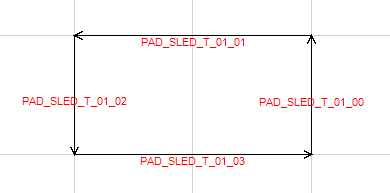
Pads follow a naming convention similar to locations, but use an additional index to group multiple static line segments into a single pad. The naming pattern is <TYPE>_<INDEX>_<SEGMENT_INDEX>.
For example, a sled pad consisting of four static line segments uses the following names:
PAD_SLED_01_00
PAD_SLED_01_01
PAD_SLED_01_02
PAD_SLED_01_03
All four segments belong to sled pad 01, with line indices ranging from 00 to 03. Similarly, PAD_HOLD_04_02 identifies line segment 02 of hold pad 04.
Pads must form a closed, convex shape, with their line segments following the correct winding order. When viewed from above, the segments must connect sequentially, starting at 00, with the interior of the pad always lying to the left of each directed segment. The final segment must connect back to the starting point of the first segment. A pad may consist of any number of segments, provided these requirements are met.
| Name | Description |
|---|---|
| PAD_RAZED | Razed floor pad. The player height is z2 of the area (upper boundary). |
| PAD_LOWERED | Lowered floor pad. The player height is z1 of the area (lower boundary). |
| PAD_HOLD | Hold pad. The player freezes for some time and can't move. |
| PAD_SLED_R | Sled pad. The player is pushed with higher speed in positive x direction. |
| PAD_SLED_L | Sled pad. The player is pushed with higher speed in negative x direction. |
| PAD_SLED_B | Sled pad. The player is pushed with higher speed in positive y direction. |
| PAD_SLED_T | Sled pad. The player is pushed with higher speed in negative y direction. |
| PAD_FLAG_REMOVER | Flag remover pad. One flag is taken from the player. |
CMerlinObject
CMerlinStatic and CMerlinBSP extends from CMerlinLine. CMerlinLine and CMerlinLocation extends from CMerlinObject. Each of the classes have their own reserved data. This is the reason why all 3 serialized classes start reading a CString, followed by the reserved data. Additional CMerlinLine defines the line segment and then the reserved data.
The class CMerlinStatic is the only class that really uses the reserved data as extension to provide additional data.